
This article explains the JavaScript execution model, including the call stack, event loop, and how asynchronous code is handled. Understanding these concepts is crucial for writing efficient and effective JavaScript code. The model is largely theoretical and abstract.
This article assumes that the reader has a basic understanding of JavaScript and its syntax. Also familiar with the execution models of other programming languages, such as C or Java. Knowledge of data structures like stacks and queues, will be helpful in understanding the concepts discussed in this article.
The engine and the host
JavaScript requires the cooperation of two pieces of software to run:
- The JavaScript engine: The JavaScript engine implements the ECMAScript specification, providing the core functionality. It takes source code, parses it, and executes it.
- The host environment: In order to interact with the outside world (file system, network, etc.), the engine needs a host environment. HTML DOM is the host environment when JavaScript is executed in a web browser, while Node.js is another host environment that allows JavaScript to be run on the server side.
Agent execution model
An agent is one independent JS runtime, which maintains its own facilities for code execution (call stack), memory management (heap), and event handling (event loop).
- Heap(of objects): It is a large (mostly unstructured) region of memory. It gets populated as objects get created in the program.
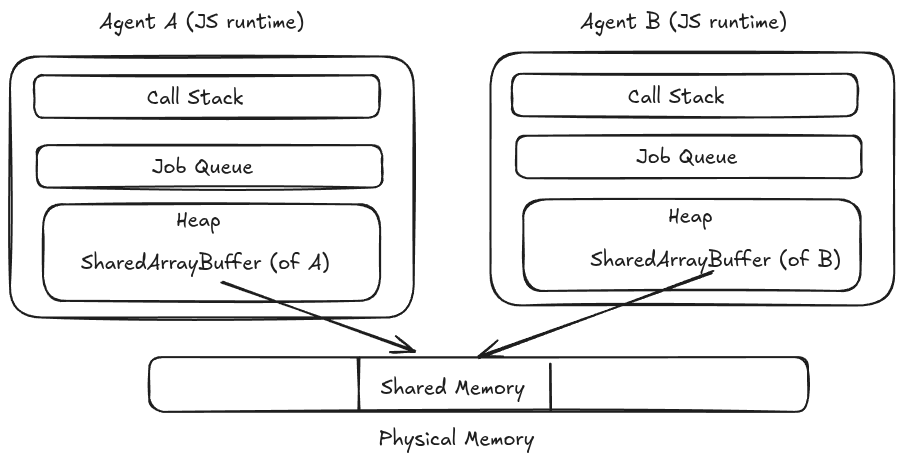
Note: In case of shared memory each agent has its own heap, so its own version of
SharedArrayBufferobject. But all those objects point to the same underlying memory. It allows safe shared data access without sharing JS objects.
-
Queue(of jobs): Also known as event loop which enables asynchronous programming in JS while being single-threaded. It’s called queue because earlier jobs are executed before later ones (First In First Out).
-
Stack(of execution contexts): Also known as call stack which allows transferring control by entering and exiting execution contexts like functions. It’s called stack because every job enters by pushing new frame onto stack, and exits by emptying the stack (Last In First Out).
An agent acts like a thread, even if it’s not always a real OS thread. We don’t control whether it is a real OS thread or a virtual thread, but JS does, and JS garuntees isolation of heap and objects in it.
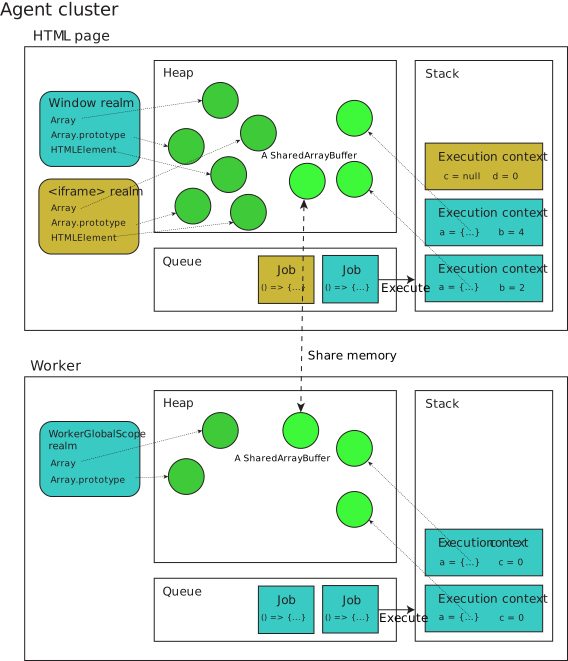
In the above diagram (source: MDN Web Docs), HTML page and Worker are two separate agents running independently and having their own heaps, stacks, and queues. This is why heavy task in worker doesn’t freeze your main web page.
- Each agent can own multiple realms, but they must be able to synchronously access each other therefore they must run in one execution thread.
- Each agent defines (usually inheriting from the underlying CPU architecture) how memory behaves for that runtime. If running on different hardware, one agent’s data could be stored in little-endian format while another’s is in big-endian format. Because of this, agents can have completely different memory models.
Little-endian and big-endian are two ways of storing multi-byte data types (like integers) in memory. In little-endian, the least significant byte is stored first, while in big-endian, the most significant byte is stored first. This can affect how data is interpreted when shared between different systems or agents.
- In above diagram, window realm and iframe realm shares the same agent.
Realms
A realm is essentially a “global environment” or a “universe” where your JS code lives. A realm contains:
- Global object: The global object is the top-level object in a realm.
e.g.,
windowin browsers,globalin Node.js. - Standard built-in objects: These are the built-in objects provided by the ECMAScript specification,
such as
Object,Array,Function, etc. - Your code: The code you write and execute within that realm.
On the web, every realm has exactly one global object, and every global object has exactly one realm (one to one relationship).
If you’ll go back to the above diagram, you can see that window and iframe are in same agent so they are sharing
heap, stack, and queue but they are different realms so they have their own window, Array, Object, etc.
So they have shared execution environment but different global environments or we can say different prototypes.
We’ll learn more about prototypes in upcoming articles, for now you can consider prototypes as a mechanism that allows objects to inherit properties and methods from other objects (Just like inheritance in OOP).
So if different realms have different prototypes then one object from one realm should not be checked for instanceof
in another realm as this check is based on the prototype chain. In case of array use Array.isArray() method to check
whether an object is an array or not as it works across realms
(it checks engine’s hidden slot [[Class]] to verify if the object is natively an array).
Here’s an example to demonstrate:
// Create an iframe and append it to the document body
const iframe = document.createElement('iframe');
document.body.appendChild(iframe);

// Create an array in the iframe's context
const iframeArray = new iframe.contentWindow.Array();
// check if iframeArray is an instance of Array in the main window's context
console.log(iframeArray instanceof Array); // false
console.log(Array.isArray(iframeArray)); // true
Stack and execution contexts
JS runs one function at a time. To remember where it is in the program, JS uses a call stack. Each function call creates a new execution context (also called as stack frame). Execution context is everything JS needs to run a function. Function calls push context, returns pop them.
Each execution context remembers:
- Where the code is currently executing (the current line of code).
- The variables and functions that are currently in scope.
- Which realm it belongs to (which global object and built-in objects it can access).
- The value of
this(which is determined by how the function was called).
We will learn more about this in upcoming articles,
for now you can consider it as a reference to the object responsible for invoking the current function.
Here’s a simple example:
function f2(b) {
  const a = 10;
  return a + b;
}

function f1(y) {
  const x = 5;
  return f2(x*y);
}

const res = f1(2);
Step by step:
- Global context created
- f1(2) called -> push f1 frame
- f2(10) called -> push f2 frame
- f2 returns 20 -> pop f2 frame
- f1 returns 20 -> pop f1 frame
- Global finishes -> stack empty
Generators
JS never executes half a function. It always executes one full execution context at a time, but generators are special. They can push and their execution context is saved, not destroyed. Generators can leave the stack and come back later.
function* gen() {
  const val = 2;
  console.log(1);
  yield;
  console.log(val);
  yield 3;
  return 5;
}

const g = gen() // creates the iterator
const firstResult = g.next(); // logs 1, returns { value: undefined, done: false }
const secondResult = g.next(); // logs 2 (context preserved), returns { value: 3, done: false }
const thirdResult = g.next(); // returns { value: 5, done: true }
const fourthResult = g.next(); // returns { value: undefined, done: true }
const fifthResult = g.next(); // returns { value: undefined, done: true }
Once done: true is returned, further calls to next() will return { value: undefined, done: true }
and will not execute any more code in the generator function.
Tail calls
Tail call means a function returns another function call directly.
function f() {
  return g();
}
What JS can do?
- Reuse the same stack frame.
fwill use the same stack frame asg. - This is called tail call optimization (TCO) and it can prevent stack overflow in recursive functions.
Reality:
- As we will be using same stack frame,
fwill no longer on the stack and won’t appear in stack trace ifg()throws an error. - Only Safari implements TCO, and they have invented some specific infra to address the debug issue. Most other engines don’t implement TCO.
Closures
A closure is a function that “remembers” the variables from where it was created (current running execution context).
function createCounter() {
  let count = 0;            // local variable

  return function () {      // inner function
    count++;                // uses outer variable
    return count;
  };
}

const counter1 = createCounter();
console.log(counter1()); // 1
console.log(counter1()); // 2
console.log(counter1()); // 3

const counter2 = createCounter();
console.log(counter2()); // 1
console.log(counter2()); // 2
Here, createCounter() returns a function, so counter1 & counter2 are functions. Now, calling counter1 will actually return the value
the inner function is returning. Even createCounter() finished count is not destroyed and inner function remembers count variable.
Each call to createCounter() creates a new execution context,
so counter1 and counter2 have their own separate count variables.
We’ll learn more about closures in upcoming articles, for now you can consider closures as a way to “capture” variables from an outer function and keep them alive even after the outer function has finished executing.
Note: Value of
thisdepends on how the function is called, meanwhile context of closure depends on where the function is created. So,thisand closure are two different concepts.
Job queue and event loop
JavaScript can do only one thing at a time, but it must never stop responding. It uses Callbacks for asynchronous work, a job queue to store those callbacks, and an event loop to decide what runs next. A job is a piece of JS code that is ready to run.
When JavaScript encounters an asynchronous operation, it delegates the task to the browser environment and immediately continues executing the rest of the code. Once the background operation finishes, its callback (along with any resulting data) becomes a job, gets added to the queue, and will be moved by the event loop to the call stack to be executed as soon as the stack is completely empty.
Tasks and microtasks
JavaScript has two types of jobs: tasks and microtasks. Tasks are scheduled by APIs like setTimeout, setInterval,
and DOM events, while microtasks are scheduled by APIs like Promise and MutationObserver.
Microtasks have a higher priority than tasks, meaning that they will be executed before tasks in the queue.
console.log("A");

setTimeout(() => console.log("B"), 0);

Promise.resolve().then(() => console.log("C"));

console.log("D");

//output :
A
D
C
B
Run-to-Completion
Once a job starts, nothing can interrupt it. JS will finish the current job and then move to the next job. Downside is if a job runs too long, everything freezes and web app doesn’t respond to clicks, scrolls, or other events and finally browser mitigates this with a warning dialog. Good practice is to keep jobs short and break long-running tasks into smaller chunks.
Never blocking
We’ve already covered that JS continues running and delegates async tasks to the browser environment.
This means JS never blocks the main thread, and the browser can continue to respond to user interactions while JS is executing other code.
There are still some legacy APIs like alert() that block the main thread, but they are not commonly used in modern web development.
I haven’t planned yet to cover this topic in separate article, but if possible I will cover it.
Agent clusters and memory sharing
An agent cluster is a group of agents that are allowed to share memory. If agents can share memory then they belong to the same cluster otherwise different clusters, and different clusters are completely isolated.
Agent cluster exists because JS wants strong isolation along with safe memory sharing and no accidental interference.
Agents in the same cluster can share memory using SharedArrayBuffer, use Atomics APIs and coordinate execution.
Agents can share memory only if their lifetimes are tied together (parent-child relationship).
Following pairs can share memory:
- Window (browser tab) and a dedicated worker (created by one parent, in this case window). Refer diagram from MDN Web Docs above
- Worker (of any type) and a dedicated worker (created by the same worker)
- Window and same-origin iframe. E.g., A browser tab embedded inside another tab with same-origin only.
- Window and window it opened (same origin)
- Window and a worklet (light weight JS environment created by parent for special tasks like CSS painting, audio processing)
and following can’t share memory:
- Window and shared worker (shared worker lives independently)
- Worker and shared worker.
- Window and service worker (service worker lives beyond pages. Lives even after all tabs are closed.)
- Cross-origin iframe
- Two unrelated windows (even if same origin). E.g., same website opened independently in two different tabs.
For now consider worker as a separate thread of execution that can run in the background independently, an assistant to the main thread (window) and can communicate with it using message passing or shared memory.
Cross-Agent communication
Agent communicate in two ways:
- Message Passing:
postMessage(data);- Data is copied
- No shared memory
- No race conditions
- Shared Memory:
postMessage(SharedArrayBuffer);- Memory shared
- Multiple agents (of same cluster) can read/write
- Requires coordination.
When memory is shared, it’s unsafe to read/write directly which can lead to data races (two agents trying to read/write at the same time).
Here Atomics comes in the picture. It will do strict ordering of events agreed upon by all agents in the cluster.
More things to prevent race conditions are to keep memory strongly typed (Int8Array, Uint8Array, Float32Array, etc.)
and avoid mixing atomic and non-atomic operations on the same memory location.
Forward progress
JS never blocks but with multiple agents, one agent may wait for another and this waiting is totally different from waiting on a network call in the same agent. Here agent stops completely and no event loop progresses, it cannot make forward progress.
To prevent such deadlocks:
- Every unblocked agent eventually runs.
- Blocking is allowed only via explicit APIs.
- Only some agents are allowed to block. On web, dedicated workers and shared workers can be blocked, but not similar-origin windows or service worker.
Why shared workers are isolated and never clustered with windows?
- Shared workers live independently of pages and serve multiple windows.
- If they shared a cluster with windows, one window could disappear holding a lock forever and other windows would starve.
Cluster Integrity Rule: An agent cluster cannot partially be alive. One agent in cluster is killed then all other agents in that cluster are terminated. This avoids deadlocks, infinite waiting and corrupt shared state.
I believe this section was full of jargon and hard to understand, You’ll understand it better with time. It was too theoretical and abstract. It’s not something you’ll stumble upon in your day-to-day JS programming.
Simple Analogy
Here a simple chef-kitchen analogy to revise what we have learned so far.
-
The Agent (The Chef): The Agent is the thread (the actual worker).
- The chef is single-minded: can only chop one vegetable at a time (single threaded).
- The chef has a to-do list: They follow a strict recipe step-by-step (The call stack).
- The chef has a ticket rail: New orders (events like clicks/timers) hang here waiting chef to be free (The message queue).
-
The Realm (The Kitchen): The realm is the environment where the cooking happens.
- The global object (
window): This is the counter layout. - Built-ins (
Array,Date): These are the standard tools like the knife, the blender, the oven. - Your variables: These are specific ingredients sitting on the counter right now.
- The global object (
-
Multiple Kitchens: Imagine a restaurant (
Browser tab) with a main kitchen (Main page) and a smaller pastry station in the corner (iframe).- One chef (One agent): There is only one chef running back and forth
- Two kitchen (Two realms): The main kitchen has its own knives and ingredients. The pastry station has different knives and different ingredients.
- Why it matters?: If the Chef takes a “Knife” (
Arrayconstructor) from the Pastry Station, it is technically a different tool than the “Knife” in the Main Kitchen, even if they look the same.
-
Separate Agents (Web Workers):
- Web Workers are like hiring a Second Chef (a new Agent).
- The Second Chef works in a completely separate building (Memory/Heap is not shared).
- The Main Chef cannot just walk over and grab ingredients; they have to shout orders over a walkie-talkie (
postMessage).
I hope you have learned something new about the JavaScript execution model. If you have any questions or feedback, feel free to reach out to me on Twitter, LinkedIn or you can even mail me. I’ll be happy to answer your questions and discuss the topic further.